Schedulsine
Elevator Pitch
An Overcooked like cooking game, but for learning OS scheduling algorithms. Different algorithms are represented as different strategies; changing the order in which you must complete dishes based on price, priority, & more. It’s timed, with your score being determined by how many dishes you successfully create.
Influences (Brief)
- Overcooked/Overcooked 2:
- Medium: Games
- Explanation: This game series is an influence mainly through its gameplay, scoring system. Players act as chefs and must prepare food very quickly. To prevent orders from being failed, typically the players must complete the orders in order of when they pop up on screen. Gameplay features include throwing, placing, and picking up objects such as food items, cookware, and plates. Players must move around items and complete orders in a timely manner in order to get the highest score, which is in the form of money and tips from customers.
- Papa's Pizzeria:
- Medium: Games
- Explanation: Mainly influenced by the scoring system & theme. A restaurant management game where you have to take orders, bake, and serve the best pizzas to the customers; essentially just taking the “taking orders” part of the game for our own game. Its high score system is also useful.
Core Gameplay Mechanics (Brief)
As stated previously, the main gameplay loop is very similar to the Overcooked series.
- The steps of a scheduling algorithm are the different steps of making a dish. Different steps lead to different end results (different algorithms).
- Recipes: Different recipes require players to follow different steps and utilize different ingredients
- Scoring: Different algorithms/dishes give different points, failing to complete a dish/algo. takes away points. Completing dishes quickly gives more points*
- Timing: There will exist a timer during gameplay. Goal would be to encourage players to try out and complete as many different algorithms(dishes) before time runs out!*
- Campaign: As players progress through the game, levels become more difficult and complex.
Learning Aspects
Understanding of tasks through game play Getting information into memory
Learning Domains
- Operating Systems.
- Logic & Algorithms.
Target Audiences
- Semi-novice programmers, just learning about Operating Systems.
- Students from late middle-school to the college level.
Target Contexts
- Ideally, used as supplementary material/practice in a course teaching the aforementioned learning domains.
- Formal learning contexts could include a syllabus set day of playing this game in a middle school or high school level class. The instructor can facilitate discussion about the game and can require students to write notes after each game is played, and have an assessment based on what they are learning from the subject.
- Informal learning contexts could include students or colleagues playing the game together, unrestricted by the classroom or studies. This can be hobby-based learning by having the game be downloadable or browser based.
- May not be entirely adequate as an "in-class" activity though.
Learning Objectives
- Scheduling Algorithms: By the end of gameplay, students will be able to write out the steps of an OS scheduling algorithm.
- Identify Algorithms: By the end of gameplay, students will be able to know the difference between the different types of scheduling algorithms.
- Combining Algorithms: By the end of gameplay, students will be able to combine algorithms together in an efficient manner.
Prerequisite Knowledge
- Prior to the game, players need to have a basic idea of how OS scheduling works.
- Prior to the game, players need to know what an operating system is.
Assessment Measures
A short pre-test and matching post-test should be designed to assess student learning.
- Can you list the steps of a given OS scheduling algorithm?
- Can you list the types of OS scheduling algorithms that exist?
- Given a diagram showcasing the steps of an algorithm, would you be able to identify which algorithm it is?
What sets this project apart?
- There are not many resources, especially in the education gaming sphere, that teaches you scheduling algorithms or operating systems in a way that is easy to understand.
- Using the steps of a dish to represent the steps of an algorithm is fairly novel.
- Cooking games tend to lack an educational value outside of just cooking.
Player Interaction Patterns and Modes
Competitive - players race against the clock to gain a certain score before time ends Level based - difficult increases as you go One mode would be for only learning without the worry of time, another would implement competition and time.
Player Interaction Pattern
Mostly designed for single-player, but could handle up to four. Requires usage of keyboard, mouse is optional. Keyboard for basic movement and actions of a character, mouse to help with menu navigation.
Player Modes
- Single-Player: Complete all levels to win. Try and obtain the highest possible score for each level.
- Multi-Player: Same as single player; however, you probably would be able to pick any level instead of going through them sequentially.
Gameplay Objectives
- Complete orders quickly and correctly:
- Description: Players must fully prepare and cook kitchen orders in a given amount of time without failing the order or making mistakes.
- Alignment: The dishes represent job processes, completing a dish represents completing a process. Dishes are completed in the style of a scheduling algorithm.
- Advance to the next level:
- Description: After completing all kitchen orders in a given amount of time, the player can advance to the next level, with more complex scheduling needs.
- Alignment: Successful completion of a single level means mastery of that specific level's scheduling needs/requirements.
- Complete all levels:
- Description: Get through all the levels to win the game.
- Alignment: Indicates basic mastery of OS scheduling algorithms, and how best to use them.
Procedures/Actions
Main control scheme would be keyboard and mouse. - WASD: Basic movement. - LEFT CLICK: Pick up/Place down object (ingredients, dishes, etc ). - RIGHT CLICK: Interact with objects (stoves, refrigerators, etc.)
Rules
- Time is finite: a set number of orders must be completed before time runs out, else you fail.
- The actual cooking ingredients are infinite, but picking them up from the fridge takes a given amount of time. In addition to this, using those ingredients on a workstation also takes time as well.
- Nudges players to be more time efficient.
- Players can only pick up one item at a time, but can still interact with workstations if need be.
Objects/Entities
- There is the player character, a chef.
- There is the kitchen, which acts as the play area and stores “workstations” that house ingredients or perform certain actions on food..
- Refrigerator, oven, food crates, plating area, etc.
- There is a pop-up on the screen, showing the current orders.
Core Gameplay Mechanics (Detailed)
- Order Completion: Players take on the role of a chef in a kitchen, preparing meals via preparation of ingredients, cooking, serving, and cleaning up all while under a time limit to complete as many dishes as possible. They receive orders, and must seek to fulfill as many orders as possible before time runs out. If they don’t meet a certain quota by the end of the level, they fail and must restart.
- Object Interaction: Players can move around the 2D plane, and can press a button to either pick up an object or interact with a workstation.
- Making a Meal: Players will have to pick up objects/ingredients from a specific workstation (such as a fridge or a food crate), and take them to another workstation to process them (such as a cutting board, or a stove). They must do so in a specific order in order to create certain dishes, and if they mess it up, they will have to trash that dish and start over.
Feedback
- Sad horn sound if the player gets an order wrong.
- Happy bell sounds if the player gets an order right.
- Congratulations music if the player successfully completes the level, with a level complete screen.
- Sad music if the player fails the level entirely, with a game over screen.
- Probably some sort of rating system, where you get a bonus on the level select screen based on how fast you complete a level.
Story and Gameplay
Presentation of Rules
There will probably be an initial tutorial popout; showing you how to move, how to interact/pick up objects, and how to complete an order. Probably all in a single tutorial level.
Presentation of Content
The steps of every dish are literally the steps of each OS scheduling algorithm. Simply by completing orders, the player will naturally learn each step of any given scheduling algorithm.
Story (Brief)
You are a chef, working in a restaurant. Every dish is represented as a different coding algorithm. You want to make enough dishes, and feed enough customers, to get to the next day.
Storyboarding
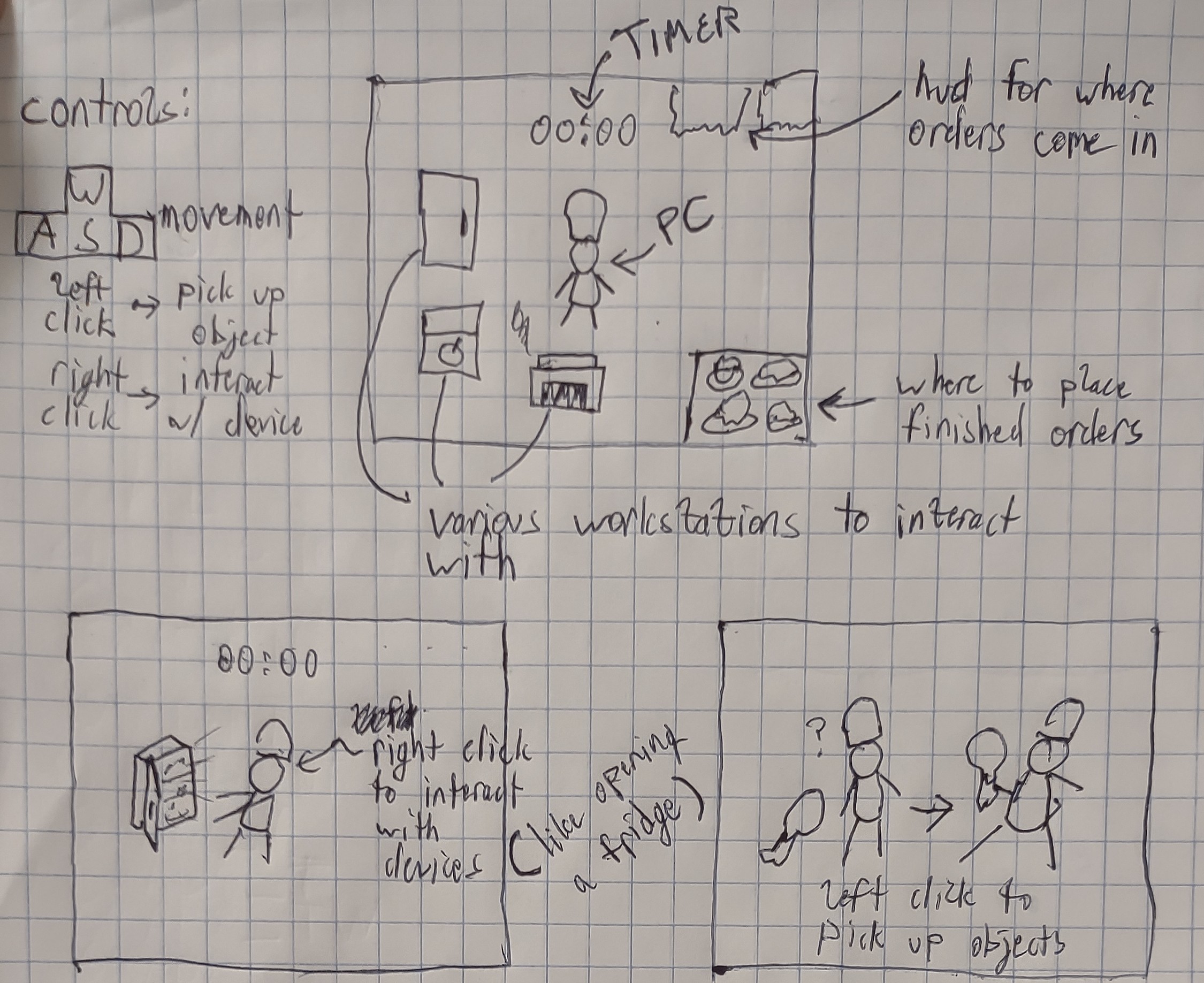
Assets Needed
Aesthetics
Happy, silly, goofy. Should be cheery, not too serious; contrasting the stressfulness of the game with the lightheartedness of funny cartoon characters.
Graphical
- Characters List
- The Chef: the main character. Detailed appearance doesn’t matter, as long as they are “chef-like”.
- Other Playable Characters: Simple color variations of the main playable character “the chef”.
- Textures:
- Foods: Apples, Tomatoes, Bread, Etc.
- Workstations: Refrigerator, Stove, Countertop.
- Dishes: Plates, culinary utensils.
- Environment Art/Textures:
- Kitchen Floor
- Kitchen Walls
- Restaurant Floor
- Restaurant Walls
Audio
- Music List (Ambient sound)
- Menu Music: Calm, Upbeat Music
-
Gameplay Music: Overcooked 2 Ost
-
Sound List (SFX)
- Interact with Workstation: Dependent on workstation (like a flame sound for the stove, or an winter-y sound for the refrigerator, etc.)
- Order Completed: Probably like the ding of a bell.
- Order Failed: Probably a depressing horn sound.
Metadata
- Template created by Austin Cory Bart acbart@udel.edu, Mark Sheriff, Alec Markarian, and Benjamin Stanley.
- Version 0.0.3
Created: May 20, 2024 07:56:25